AI agents are moving from demos to production. They handle customer support, orchestrate complex workflows, and make real-time decisions that affect business outcomes. But there is a gap between a working prototype and a production system: agents need reliable, low-latency access to structured data, they need to remember what happened in prior interactions, and all of this access needs to be governed.
This is where feature stores enter the picture. In this post, we show how Feast — an open-source feature store — can serve as both the context provider and the persistent memory layer for AI agents, using the Model Context Protocol (MCP).
The Problem: Agents Need Context, Memory, and Governance
A standalone LLM knows nothing about your customers, your products, or your internal processes. To make good decisions, agents need tools that give them access to real data:
- Who is this user? Their plan tier, account age, purchase history, satisfaction score.
- What do we know about this topic? Relevant documentation, knowledge-base articles, FAQs.
- What happened before? What did this agent discuss with this customer last time? What was left unresolved?
That last point is critical and often overlooked. Most agent demos are stateless — every conversation starts from scratch. But real support interactions build on prior context: “I called about this yesterday”, “you said you’d escalate”, “I prefer email over chat.” An agent without memory cannot handle these.
Without a proper data layer, teams end up writing ad-hoc database queries, hardcoding API calls, stuffing memory into Redis with no governance, or giving agents raw database access. This creates fragile, ungoverned, and hard-to-audit agent systems.
Feature Stores Solve This — Including Memory
Feature stores were built to solve exactly this class of problem — albeit originally for traditional ML. They provide:
- Low-latency online serving of pre-computed features.
- Versioned, governed access to data with RBAC and audit trails.
- Consistency between training/offline and serving/online environments.
- A single abstraction over diverse data sources (databases, data warehouses, streaming systems, and vector stores — including Milvus, Elasticsearch, Qdrant, PGVector, and FAISS).
- Entity-keyed read/write — the same mechanism that serves features can also store and retrieve agent memory, keyed by customer ID, session ID, or any entity.
With Feast’s MCP support, these capabilities are exposed as tools that AI agents can discover and call dynamically — and critically, agents can write back to the feature store, turning it into a governed memory layer.
Feast + MCP: Turning a Feature Store into an Agent Tool
The Model Context Protocol (MCP) is an open standard that lets AI applications discover and interact with external tools through a unified interface. Feast’s feature server can now expose its endpoints as MCP tools with a simple configuration change:
feature_server:
  type: mcp
  enabled: true
  mcp_enabled: true
  mcp_transport: http
  mcp_server_name: "feast-feature-store"
  mcp_server_version: "1.0.0"
Once enabled, any MCP-compatible agent — whether built with LangChain, LlamaIndex, CrewAI, AutoGen, or a custom framework — can connect to http://your-feast-server/mcp and discover available tools like get-online-features for entity-based retrieval, search for vector similarity search, vector_store_search for OpenAI-compatible text search, and write-to-online-store for persisting agent state.
A Concrete Example: Customer-Support Agent with Memory
To make this tangible, let’s walk through a customer-support agent that uses Feast for structured feature retrieval, document search, and persistent memory.
Note on the implementation: This example builds the agent loop from scratch using the OpenAI tool-calling API and the MCP Python SDK — no framework required. All Feast interactions use the MCP protocol: the agent connects to Feast’s MCP endpoint, discovers available tools via
session.list_tools(), and invokes them viasession.call_tool(). We chose this approach to keep dependencies minimal and make every Feast interaction visible. In production, you would typically use a framework like LangChain/LangGraph, LlamaIndex, CrewAI, or AutoGen. Because Feast exposes a standard MCP endpoint, any of these frameworks can auto-discover the tools with zero custom code (see Connecting Your Agent Framework below).
The Setup
We define three feature views in Feast:
Customer profiles — structured data served from the online store:
customer_profile = FeatureView(
    name="customer_profile",
    entities=[customer],
    schema=[
        Field(name="name", dtype=String),
        Field(name="email", dtype=String),
        Field(name="plan_tier", dtype=String),
        Field(name="account_age_days", dtype=Int64),
        Field(name="total_spend", dtype=Float64),
        Field(name="open_tickets", dtype=Int64),
        Field(name="satisfaction_score", dtype=Float64),
    ],
    source=customer_profile_source,
    ttl=timedelta(days=1),
)
Knowledge base — support articles stored as vector embeddings (Feast supports multiple vector backends including Milvus, Elasticsearch, Qdrant, PGVector, and FAISS — this example uses Milvus):
knowledge_base = FeatureView(
    name="knowledge_base",
    entities=[document],
    schema=[
        Field(
            name="vector", dtype=Array(Float32),
            vector_index=True,
            vector_search_metric="COSINE",
        ),
        Field(name="title", dtype=String),
        Field(name="content", dtype=String),
        Field(name="category", dtype=String),
    ],
    source=knowledge_base_source,
    ttl=timedelta(days=7),
)
Agent memory — per-customer interaction state written back by the agent:
agent_memory = FeatureView(
    name="agent_memory",
    entities=[customer],
    schema=[
        Field(name="last_topic", dtype=String),
        Field(name="last_resolution", dtype=String),
        Field(name="interaction_count", dtype=Int64),
        Field(name="preferences", dtype=String),
        Field(name="open_issue", dtype=String),
    ],
    ttl=timedelta(days=30),
)
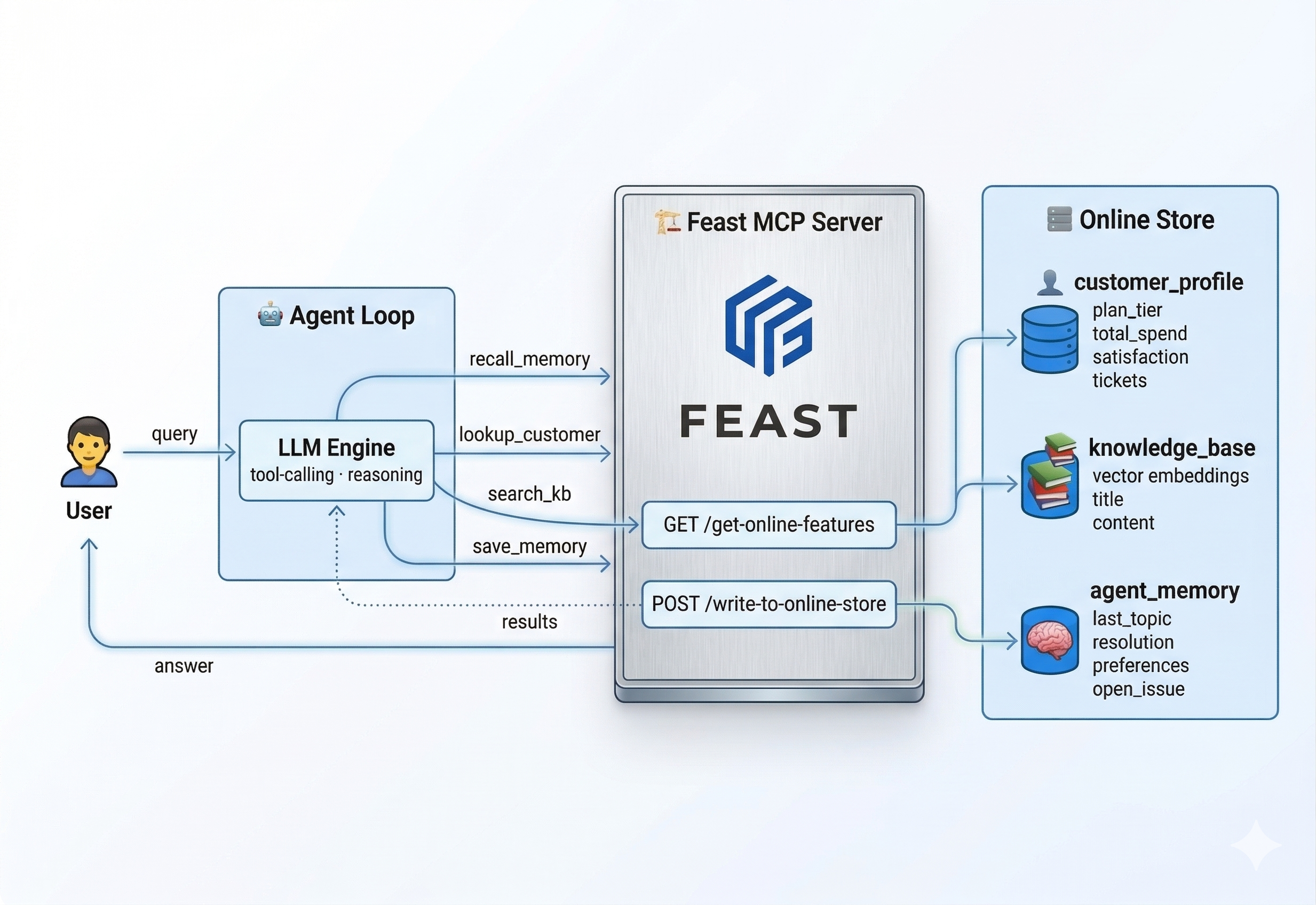
This is the key insight: Feast is not just providing context to the agent — it is also storing the agent’s memory. The agent_memory feature view is entity-keyed by customer ID, TTL-managed (30-day expiration), schema-typed, and governed by the same RBAC as every other feature. The agent reads prior interactions via recall_memory, and memory is automatically checkpointed after each turn using the same online store infrastructure.
The Agent Loop
The agent connects to Feast’s MCP endpoint, discovers tools dynamically, and uses the MCP protocol for all Feast interactions. Each round, the LLM sees the conversation history plus the available read tools, and decides what to do. Memory is saved automatically after the turn — framework-style, not as an LLM decision:
from mcp import ClientSession
from mcp.client.streamable_http import streamablehttp_client

async with streamablehttp_client("http://localhost:6566/mcp") as (r, w, _):
    async with ClientSession(r, w) as session:
        await session.initialize()
        tools = await session.list_tools()  # discover Feast tools

        for round in range(MAX_ROUNDS):
            response = call_llm(messages, tools=[...])

            if response.finish_reason == "stop":
                break

            for tool_call in response.tool_calls:
                result = await session.call_tool(name, args)  # MCP
                messages.append(tool_result(result))

        # Framework-style checkpoint: auto-save via MCP
        await session.call_tool("write_to_online_store", {...})
A typical multi-turn flow looks like:
- Round 1: Agent calls
recall_memory("C1001")— checks for prior interactions. Callslookup_customer("C1001")— gets profile data. Callssearch_knowledge_base("SSO setup")— finds the relevant article. - Round 2: Has enough context. Generates a personalised response and returns it.
- Checkpoint: The framework auto-saves
topic="SSO setup"and a resolution summary to Feast.
When C1001 comes back later and says “I’m following up on my SSO question”, the agent calls recall_memory and immediately knows what was discussed — no re-explanation needed.
For a simpler question like “What’s my current plan?”, the agent only calls lookup_customer — skipping the knowledge base entirely. The LLM makes these routing decisions based on the question, not hardcoded logic.
Memory as Infrastructure
Production agent frameworks treat persistence as infrastructure, not an LLM decision:
- LangGraph uses checkpointers (
MemorySaver,PostgresSaver) that auto-save state after every graph step, keyed bythread_id. - CrewAI enables
memory=Truefor automatic short-term, long-term, and entity memory. - AutoGen uses post-conversation hooks to extract and store learnings.
This demo follows the same pattern. The LLM has three read tools for reasoning; memory is checkpointed by the framework after each turn via Feast’s write-to-online-store endpoint. This ensures consistent, reliable memory regardless of LLM behaviour — no risk of the model forgetting to save or writing inconsistent state. Feast is a natural fit for this checkpoint layer because it provides entity-keyed storage, TTL-managed expiration, schema enforcement, RBAC governance, and offline queryability — all out of the box.
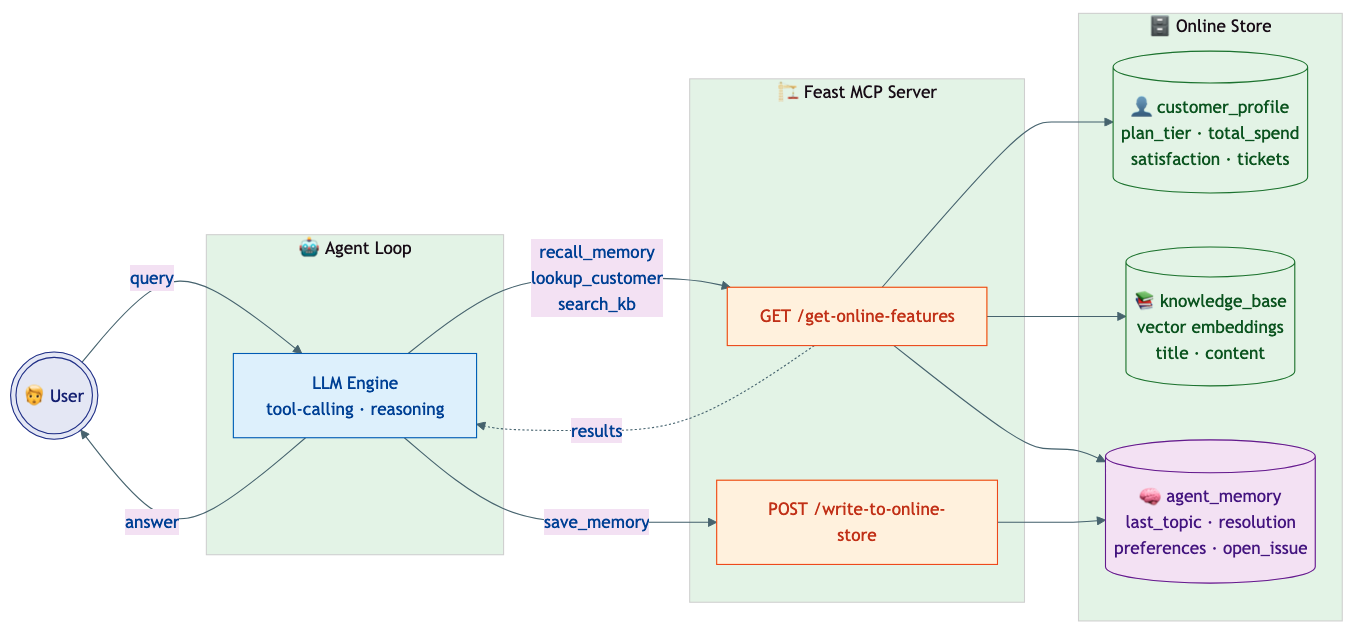
The agent doesn’t need to know where the data lives or which vector database is behind the scenes. It calls Feast through a standard protocol, and Feast handles the routing to the right store — whether that’s Milvus, Elasticsearch, Qdrant, PGVector, or FAISS. Swapping the vector backend is a configuration change, not a code change. The same protocol handles both reads and writes — context retrieval and memory persistence use the same governed infrastructure.
The Response
Instead of a generic answer, the agent produces something like:
“Hi Alice! Since you’re on our Enterprise plan, SSO is available for your team. Go to Settings > Security > SSO and enter your Identity Provider metadata URL. We support SAML 2.0 and OIDC. Once configured, all team members will authenticate through your IdP. As an Enterprise customer, you also have a dedicated Slack channel and account manager if you need hands-on help.”
The personalisation (mentioning the Enterprise plan, dedicated Slack channel) comes directly from the Feast features. And if Alice calls back next week, the agent already knows what was discussed.
Why This Matters for Production
Unified Data Access: Structured Features + Vector Search + Memory
Real-world agents need more than document retrieval. They need access to multiple data types through a single governed interface:
| Data Type | Example | Feast Capability |
|---|---|---|
| Structured features | Account tier, spend history | get_online_features |
| Vector embeddings | Support article search | retrieve_online_documents_v2 |
| Agent memory | Last interaction topic, open issues | get_online_features + write_to_online_store |
| Streaming features | Real-time click counts | Push sources with write_to_online_store |
| Pre-computed predictions | Churn probability | Served alongside other features |
Feast unifies all of these behind a single API that agents can both read from and write to.
Context Memory: Why Feast Beats Ad-Hoc Solutions
Many teams use Redis, in-memory dicts, or custom databases for agent memory. Feast provides a better foundation:
| Concern | Ad-hoc Memory | Feast Memory |
|---|---|---|
| Governance | No RBAC, no audit trail | Same RBAC and permissions as all features |
| TTL management | Manual expiration logic | Declarative TTL on the feature view |
| Entity-keying | Custom key design | Native entity model (customer_id, session_id, etc.) |
| Observability | Custom logging | Integrated with OpenTelemetry and MLflow traces |
| Offline analysis | Separate export pipeline | Memory is just another feature — queryable offline |
| Schema evolution | Unstructured blobs | Typed schema with versioning |
Because agent memory is stored as a standard Feast feature view, it inherits all the infrastructure that already exists for serving ML features: monitoring, access control, TTL management, and offline queryability. There is no separate system to operate.
Governance: Who Can Access What
In production, you do not want every agent to access every feature. Feast provides:
- RBAC: Role-based access control with OIDC integration.
- Feature-level permissions: Control which feature views each service account can read or write.
- Audit trails: Track which agent accessed which features and when.
This is especially important for memory: you want governance over what agents remember and who can read those memories.
Production Platform Architecture
Deploying agents in production requires more than just the agent code. A well-architected platform wraps agents in enterprise infrastructure without requiring changes to the agent itself. Feast fits naturally into this layered approach:
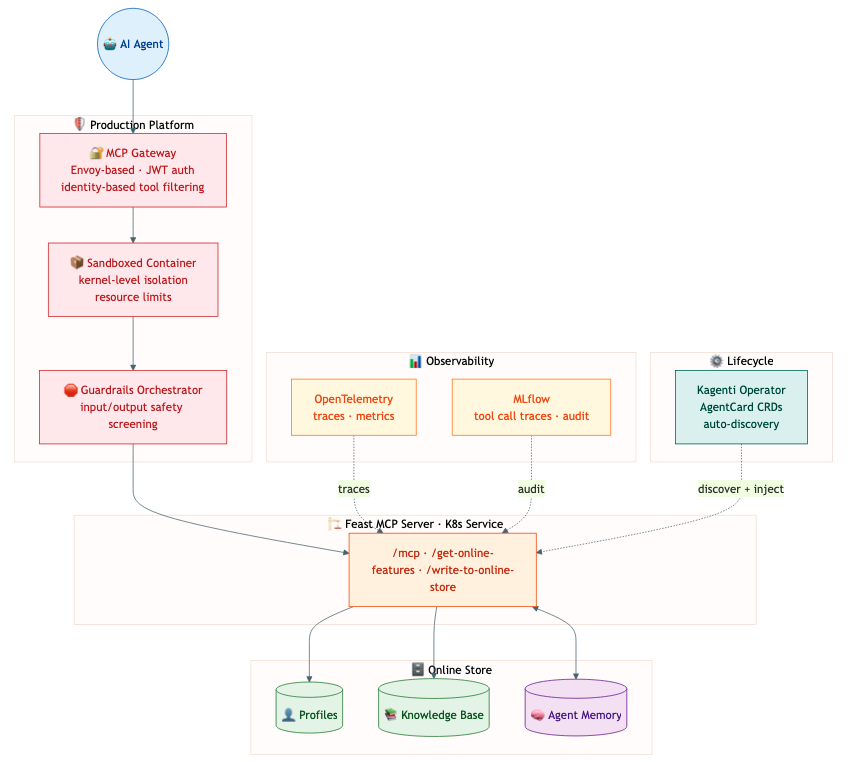
- MCP Gateway: Feast sits behind an Envoy-based MCP Gateway as one of many tool servers. The gateway provides identity-based tool filtering — an agent’s JWT claims determine whether it can call Feast at all, and which features it can access.
- Sandboxed Execution: Feast runs as a standard Kubernetes service, benefiting from sandboxed container isolation that keeps agent workloads separated.
- Observability: Feast feature-retrieval and memory-write calls flow through the platform’s OpenTelemetry pipeline, appearing in MLflow traces alongside LLM calls and tool invocations.
- Agent Lifecycle Management (Kagenti): An operator like Kagenti can discover Feast as a tool server via AgentCard CRDs and inject tracing and governance without code changes.
The principle is straightforward: the agent is yours, the platform provides the guardrails, and Feast provides the data and memory.
Connecting Your Agent Framework
Since Feast exposes a standard MCP endpoint, integration is framework-agnostic:
LangChain / LangGraph:
from langchain_mcp_adapters.client import MultiServerMCPClient
from langgraph.prebuilt import create_react_agent

async with MultiServerMCPClient(
    {"feast": {"url": "http://feast-server:6566/mcp", "transport": "streamable_http"}}
) as client:
    tools = client.get_tools()
    agent = create_react_agent(llm, tools)
    result = await agent.ainvoke({"messages": "How do I set up SSO?"})
LlamaIndex:
from llama_index.tools.mcp import aget_tools_from_mcp_url
from llama_index.core.agent.function_calling import FunctionCallingAgent
from llama_index.llms.openai import OpenAI

tools = await aget_tools_from_mcp_url("http://feast-server:6566/mcp")
agent = FunctionCallingAgent.from_tools(tools, llm=OpenAI(model="gpt-4o-mini"))
response = await agent.achat("How do I set up SSO?")
Claude Desktop / Cursor:
{
  "mcpServers": {
    "feast": {
      "url": "http://feast-server:6566/mcp",
      "transport": "streamable_http"
    }
  }
}
Direct REST API:
import requests

features = requests.post("http://feast-server:6566/get-online-features", json={
    "features": ["customer_profile:plan_tier", "customer_profile:satisfaction_score"],
    "entities": {"customer_id": ["C1001"]},
}).json()
The Feast-specific integration is just connecting to the MCP endpoint and getting the tools. Once you have them, building the agent follows each framework’s standard patterns — the tool-calling loop, message threading, and state persistence are handled natively. Feast’s MCP endpoint means zero custom wiring.
Customizing for Your Use Case
This demo’s system prompt, tool names, and feature views are all specific to the customer-support scenario. Here’s what changes when you build your own agent:
| What | This demo | Your agent |
|---|---|---|
| Feature views | customer_profile, knowledge_base, agent_memory | Define your own in features.py (e.g., product_catalog, order_history, fraud_signals) |
| System prompt | “Call recall_memory and lookup_customer first…” | Write instructions specific to your domain and workflow |
| Tool wrappers | lookup_customer, search_knowledge_base, recall_memory | Optional — see below |
Do you need custom tool wrappers? It depends on how you build your agent:
-
With a framework (LangChain, LlamaIndex, etc.): No. The framework discovers Feast’s generic MCP tools (
get_online_features,retrieve_online_documents,write_to_online_store) automatically. The LLM calls them directly with your feature view names and entities. No wrapper code needed. -
With a raw loop (like this demo): Optional but recommended. This demo wraps
get_online_featuresintolookup_customerandrecall_memoryto give the LLM friendlier, domain-specific tool names. You’d create similar wrappers for your use case (e.g.,check_inventory,get_order_status). The wrappers are thin — they just call the Feast MCP tool with the right feature names and entities.
What stays the same regardless of use case: Feast’s MCP server, the online/offline store infrastructure, RBAC, TTL management, and the auto-save memory pattern. You define feature views, feast apply, start the server, and connect — the same three generic MCP tools serve any domain.
Try It Yourself
We have published a complete working example in the Feast repository. A single script handles setup, server startup, and the demo:
git clone https://github.com/feast-dev/feast.git
cd feast/examples/agent_feature_store

./run_demo.sh                          # demo mode (no API key needed)
OPENAI_API_KEY=sk-... ./run_demo.sh    # live LLM tool-calling
The script installs dependencies, generates sample data (customer profiles, knowledge-base articles, and the agent memory scaffold), starts the Feast MCP server, runs the agent, and tears everything down on exit.
To run with a real LLM, set the API key and (optionally) the base URL and model:
# OpenAI
export OPENAI_API_KEY="sk-..."  # pragma: allowlist secret
./run_demo.sh

# Ollama (free, local -- no API key needed)
ollama pull llama3.1:8b
export OPENAI_API_KEY="ollama"  # pragma: allowlist secret
export OPENAI_BASE_URL="http://localhost:11434/v1"
export LLM_MODEL="llama3.1:8b"
./run_demo.sh

# Any OpenAI-compatible provider (Azure, vLLM, etc.)
export OPENAI_API_KEY="your-key"  # pragma: allowlist secret
export OPENAI_BASE_URL="https://your-endpoint/v1"
export LLM_MODEL="your-model"
./run_demo.sh
The agent demonstrates memory continuity: when the same customer returns, the agent recalls what was discussed previously.
See the full example on GitHub.
What’s Next
The intersection of feature stores and agentic AI is just getting started. Here is what we are working on:
- Richer MCP tools: Exposing
retrieve_online_documents_v2as a first-class MCP tool for native vector search. - Memory patterns: Expanding the memory model to support session-scoped memory, hierarchical summarisation, and cross-agent shared memory.
- Platform integration: First-class support in MCP Gateway tool catalogs and agent lifecycle operators.
- Streaming features for agents: Real-time feature updates from Kafka/Flink that agents can subscribe to.
Join the Conversation
We would love to hear how you are using (or plan to use) Feast in your agent workflows. Reach out on Slack or GitHub — and give the example a try!