Feature computation and feature consumption have different jobs. A data platform needs to build aggregates, backfill history, and keep online values fresh. Model developers need to find those features, assemble training datasets, and retrieve the same feature definitions when making predictions.
The new Feast–Chronon integration connects those workflows. Teams using Chronon can register its outputs in Feast, retrieve historical features from Parquet, and fetch online features from a Chronon service through Feast’s Python APIs. Chronon continues to own computation, materialization, and online serving.
The integration merged into Feast’s master branch on October 5, 2026. The examples below use a source checkout containing it; Feast 0.66.0, the latest published release at the time of writing, predates this integration.
How the systems work together
Chronon supports batch and streaming feature computation, windowed aggregations, backfills, and online serving. Feast adds a registry of entities, feature views, and feature services that applications can use for feature retrieval.
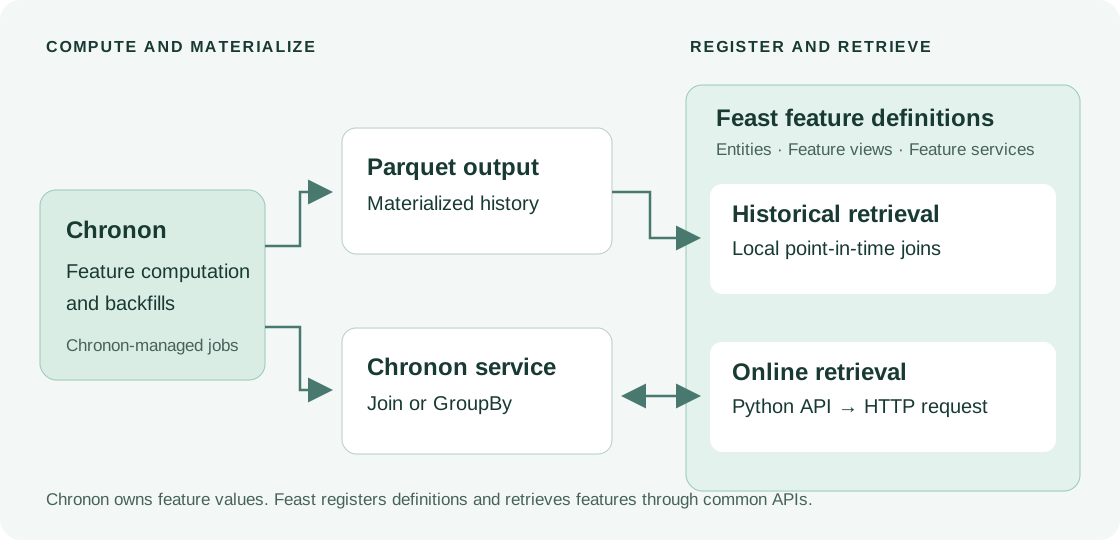
There are two retrieval paths:
| Workflow | Where the values come from | Feast API |
|---|---|---|
| Training and historical analysis | Chronon’s materialized Parquet output | get_historical_features() |
| Online inference | A Chronon Join or GroupBy service endpoint | get_online_features() |
Online requests go to Chronon’s existing service. This avoids requiring an additional copy of the feature values in a Feast-managed online store. Chronon jobs and their serving infrastructure remain part of your Chronon deployment; registering a feature view in Feast does not create those jobs.
Connect a Chronon source
A feature repository can select the Chronon provider and stores in feature_store.yaml:
project: chronon_features
registry: data/registry.db
provider: chronon
offline_store:
  type: chronon
online_store:
  type: chronon
  path: http://localhost:19000
  timeout: 30
  verify_ssl: true
Each feature view uses a ChrononSource to identify its Parquet output and, for online reads, the Chronon object to query. For example, a source for an existing customer-features Join could look like this:
from feast import ChrononSource

customer_source = ChrononSource(
    name="customer_features",
    materialization_path="data/chronon/customer_features.parquet",
    chronon_join="team/customer_features.v1",
    timestamp_field="event_timestamp",
)
The Join name and file path must match your Chronon deployment and exported data. Use chronon_group_by instead of chronon_join when querying a GroupBy; an online source names exactly one of them. Offline-only sources can omit both.
Define the entity keys and feature schema in a Feast FeatureView, then register it and any FeatureService with store.apply(). Field names must match Chronon’s output, or be translated explicitly with field_mapping. This matters for Join outputs, which can carry prefixed feature names. The source reference describes these settings.
Retrieve the right historical values
For training, Feast joins entity rows and their timestamps against Chronon’s materialized Parquet data. It selects the latest feature row at or before each entity timestamp and applies the feature view’s TTL. If duplicate event timestamps exist, a configured created-timestamp column breaks the tie by selecting the latest created row.
That timestamp boundary matters. A model trained on a customer’s activity as of Monday should not see an aggregate from Wednesday. Feast’s historical retrieval applies that boundary to the rows Chronon has already produced; the correctness of those upstream aggregates still depends on the Chronon pipeline.
The current adapter projects the required Parquet columns and performs the joins locally in pandas. Size training requests for the available memory. Historical results can also include local Python on-demand transformations and be saved as Parquet datasets for later retrieval.
Online expiration is controlled by Chronon. A Feast TTL used for historical retrieval does not become a separate expiration policy for the Chronon service.
Try the checkout-risk demo
The repository includes a small offline example and a live checkout-risk scenario. From a Feast source checkout with its Python dependencies installed, the offline example runs without a Chronon service:
uv run python examples/chronon/run_demo.py --offline-onlyIt creates a small illustrative Parquet fixture, registers it as a Chronon source, and retrieves historical driver features. This is a quick way to inspect the retrieval path before connecting real materializations.
The live scenario uses Chronon’s quickstart/training_set.v2 Join. It registers a Feast feature service called checkout_risk_v1, retrieves purchase and refund aggregates for multiple users, and prints Feast results alongside a direct Chronon response for comparison. An unknown user exercises missing-feature behavior.
After starting the Chronon quickstart service using the demo setup instructions, run:
CHRONON_SERVICE_URL=http://127.0.0.1:19000 \
uv run python examples/chronon/run_demo.py \
  --scenario checkout-risk \
  --online-only \
  --user-ids 5,7,999999
The pinned quickstart image requires an ARM64 Docker host, or a compatible image supplied through CHRONON_QUICKSTART_IMAGE. The setup guide includes the required Chronon build and service-launch steps.
Successful missing values remain missing in Feast’s response. HTTP errors and failed Chronon response rows raise errors, so a backend failure does not silently become an unknown user’s feature vector. The quickstart validates these integration paths; it does not establish production latency or throughput.
What is covered today
The integration includes unit tests, HTTP stub tests, and a CI workflow that builds and queries a pinned live Chronon service. The live scenario exercises a Join; GroupBy routing is covered by unit tests. The Feast operator’s v1 and v1alpha1 schemas also accept chronon for online and offline persistence after the operator follow-up.
The adapter supports Python retrieval. Feast-managed writes into Chronon, Chronon infrastructure provisioning, and distributed historical joins are outside its current scope. These boundaries let teams reuse an existing Chronon deployment while adopting Feast’s feature registry and application-facing APIs.
Start with the runnable example, then use the online-store reference and offline-store reference to connect your own features.