Native MLflow Integration for Feast
The Problem: Features and Experiments Live in Separate Worlds
Feast manages your features. MLflow tracks your experiments. But between the two, there has always been a manual gap.
When a data scientist trains a model, the features that shaped it are retrieved from Feast, but MLflow has no idea which features were used, which feature service they belong to, or what entity DataFrame produced the training set. The result is a familiar set of problems:
- “Which features did model v3 use?” — dig through notebooks and hope the comments are accurate.
- “Can I reproduce the training data for last month’s experiment?” — re-derive the entity DataFrame from memory.
- “Which models break if I change
driver_hourly_stats?” — grep through repos and ask around. - “I promoted a model — which features do I need to serve?” — read the training script, cross-reference with the feature registry.
Teams have tried to close this gap with manual mlflow.log_param("features", ...) calls, custom wrappers, or convention-based tagging. These approaches are fragile, inconsistent, and the first thing to break when someone new joins the team.
The Solution: One Config Line, Automatic Lineage
Starting with Feast v0.62, the Feast–MLflow integration is native and zero-code. Add an mlflow: block to your feature_store.yaml, and every feature retrieval inside an active MLflow run is automatically tagged with the features, feature views, feature service, entity count, and retrieval duration.
project: driver_ranking
registry: data/registry.db
provider: local
online_store:
  type: sqlite
  path: data/online_store.db
mlflow:
  enabled: true
  tracking_uri: http://127.0.0.1:5000
That’s it. No decorators, no wrappers, no import mlflow scattered through your training code.
How It Works
Auto-Logging: Zero Code, Full Lineage
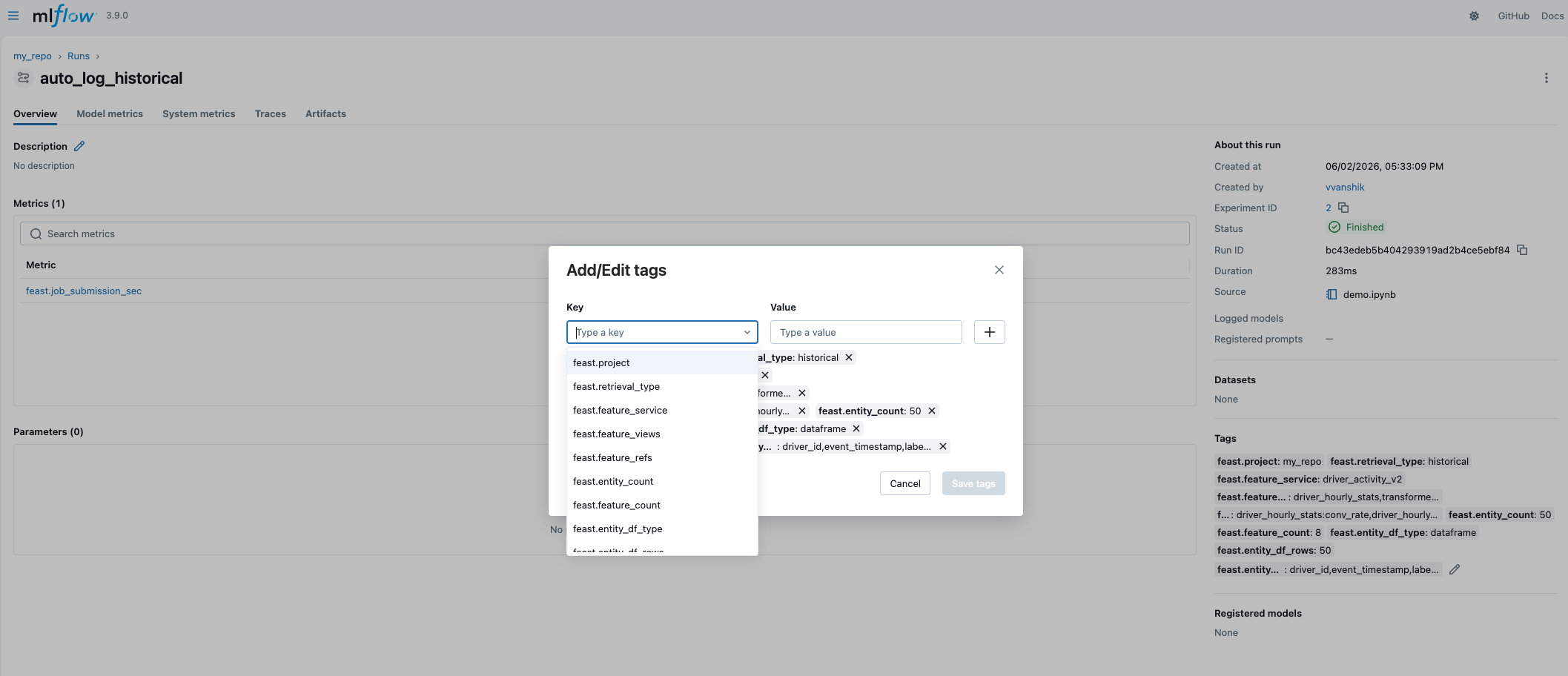
When mlflow.enabled: true and an active MLflow run exists, Feast hooks into get_historical_features() and get_online_features() at the end of each call and writes structured metadata to the run:
| Tag | Example |
|---|---|
feast.project | driver_ranking |
feast.retrieval_type | historical |
feast.feature_service | driver_activity_v1 |
feast.feature_views | driver_hourly_stats |
feast.feature_refs | driver_hourly_stats:conv_rate, driver_hourly_stats:acc_rate |
feast.entity_count | 200 |
feast.feature_count | 5 |
feast.job_submission_sec | 0.43 (metric) |
Even if features are passed as a list of refs rather than a FeatureService object, Feast auto resolves the matching feature service from the registry. The resolution is cached with a 5-minute TTL, so there is no registry overhead on every call.
The store.mlflow API
The integration surfaces through a single property on FeatureStore:
from feast import FeatureStore
store = FeatureStore(".")

with store.mlflow.start_run(run_name="v1_training"):
    # Auto-logged: feature refs, feature views, entity count, duration
    training_df = store.get_historical_features(
        features=store.get_feature_service("driver_activity_v1"),
        entity_df=entity_df,
    ).to_df()

    model = train(training_df)

    # Saves feast_features.json alongside the model artifact
    store.mlflow.log_model(model, "model")

    train_run_id = store.mlflow.active_run_id

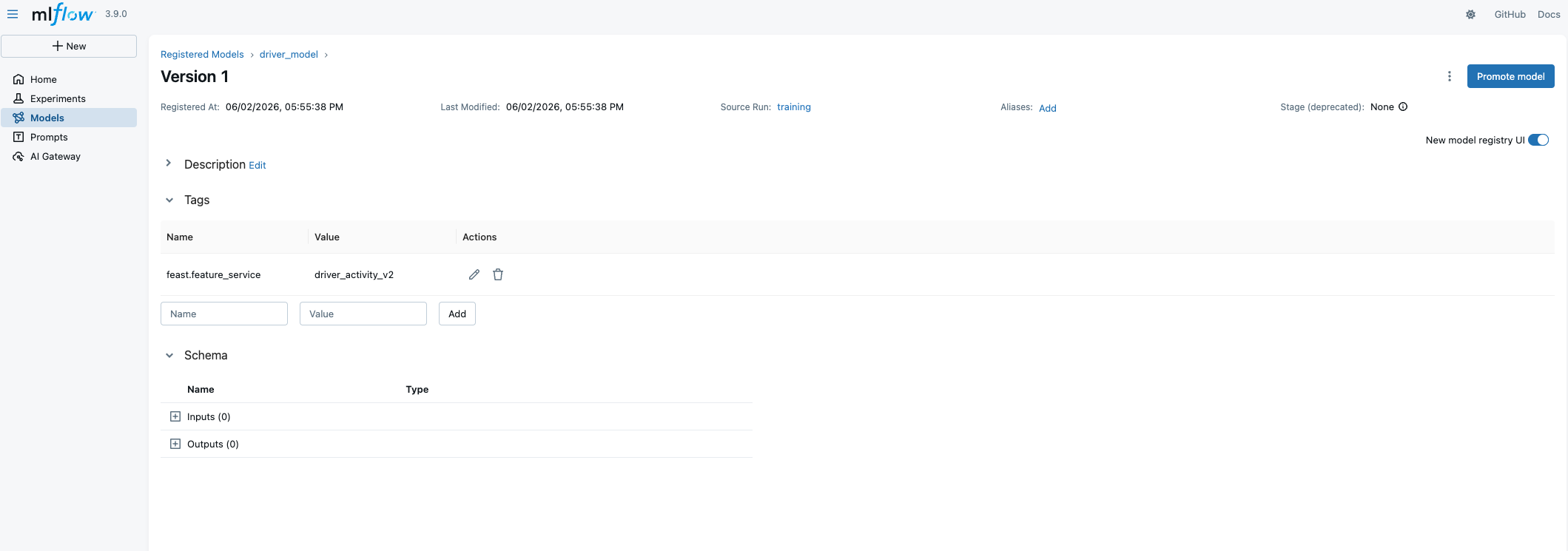
# Propagates feast.feature_service to the model version
store.mlflow.register_model(f"runs:/{train_run_id}/model", "driver_model")

# Prediction: links back to the training run
with store.mlflow.start_run(run_name="batch_prediction"):
    model = store.mlflow.load_model("models:/driver_model/1")
    features = store.get_online_features(
        features=store.get_feature_service("driver_activity_v1"),
        entity_rows=[{"driver_id": 1001}],
    )
    predictions = model.predict(...)
store.mlflow is lazy-initialized on first access. When MLflow is not installed or enabled is false, it returns None — so existing code that doesn’t use MLflow is unaffected.
Model-to-Feature Resolution
This is the capability that closes the loop between experiment tracking and production serving. Given any registered model URI, Feast can tell you exactly which feature service it needs:
fs_name = store.mlflow.resolve_features("models:/driver_model/1")
# Returns: "driver_activity_v1"
Resolution follows a precise chain:
- Check the model version tag
feast.feature_service(set byregister_model) - Fall back to the training run tag
feast.feature_service(set by auto-logging) - Validate against the
feast_features.jsonartifact to ensure the feature service projections match the features the model was actually trained on
If there is a mismatch : say someone renamed a feature in the service after training — resolve_features() raises FeastMlflowModelResolutionError with a clear diff. No silent serving skew.
This enables a powerful production pattern: your serving pipeline doesn’t hardcode feature names. It resolves them from the model:
fs_name = store.mlflow.resolve_features(f"models:/driver_model/production")
features = store.get_online_features(
    features=store.get_feature_service(fs_name),
    entity_rows=request_entities,
)
Promote a new model version that uses different features, and the serving pipeline auto-adapts.
Training Reproducibility
When auto_log_entity_df: true, the integration saves the entity DataFrame as a Parquet artifact on every historical retrieval. Later, you can reconstruct the exact training inputs:
entity_df = store.mlflow.get_training_entity_df(run_id="abc123")

with store.mlflow.start_run(run_name="retrain_v2"):
    new_df = store.get_historical_features(
        features=store.get_feature_service("driver_activity_v1"),
        entity_df=entity_df,
    ).to_df()
Even without entity DataFrame archival, Feast always logs metadata : row count, column names, date range, or the SQL query — so you have an audit trail of what went into the model.

Operations Audit Trail
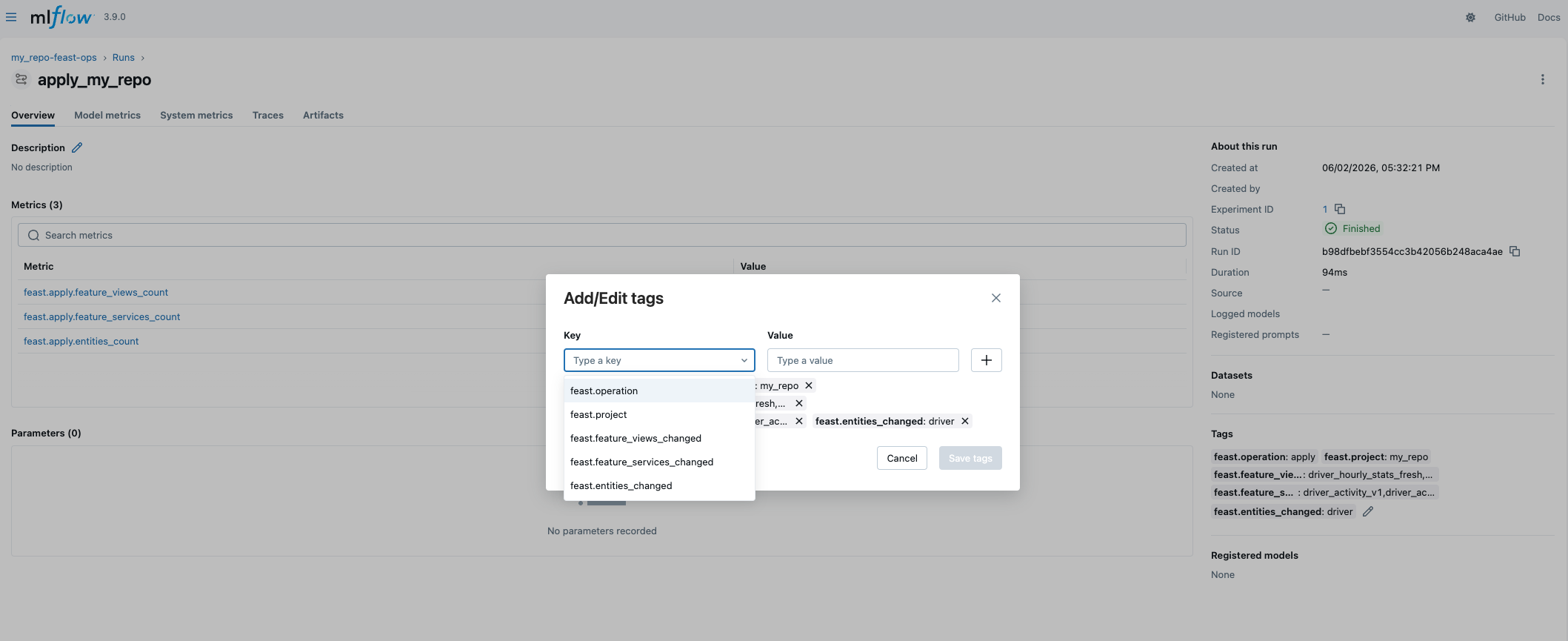
When log_operations: true, feast apply and feast materialize are logged to a dedicated MLflow experiment ({project}-feast-ops). These are self-contained runs : they don’t require a user-initiated active run:
mlflow:
  enabled: true
  log_operations: true
  ops_experiment_suffix: "-feast-ops"
Apply runs record which feature views, feature services, and entities were created, updated, or deleted. Materialize runs record the feature views, date range, and duration. This gives platform teams a time-series audit trail of every registry and materialization change.
Dataset Tracking
For teams that use MLflow’s dataset tracking, the integration provides an explicit API:
store.mlflow.log_training_dataset(
    df=training_df,
    dataset_name="driver_training_v1",
    source="feast.get_historical_features",
)
This uses mlflow.data.from_pandas and mlflow.log_input to register the DataFrame as a dataset input on the active run.
Two Access Patterns
The integration provides two ways to access MLflow, depending on your preference:
1. store.mlflow — explicit, multi-store safe
store = FeatureStore(".")
store.mlflow.start_run(run_name="training")
store.mlflow.log_model(model, "model")
store.mlflow only exposes Feast-enhanced methods. For raw MLflow access, use the escape hatches:
store.mlflow.client        # MlflowClient instance
store.mlflow.mlflow        # raw mlflow module
2. feast.mlflow — drop-in module replacement
import feast.mlflow

feast.mlflow.start_run(run_name="training")      # Feast-enhanced
feast.mlflow.log_params({"lr": "0.01"})           # passthrough to mlflow
feast.mlflow.log_model(model, "model")            # Feast-enhanced
feast.mlflow auto-discovers the most recently created FeatureStore. For Feast-specific methods (like log_model, register_model, resolve_features), it uses the enhanced version. For everything else (log_params, set_tag, MlflowClient, …), it delegates to raw mlflow. One import, both worlds.
Feast UI Integration
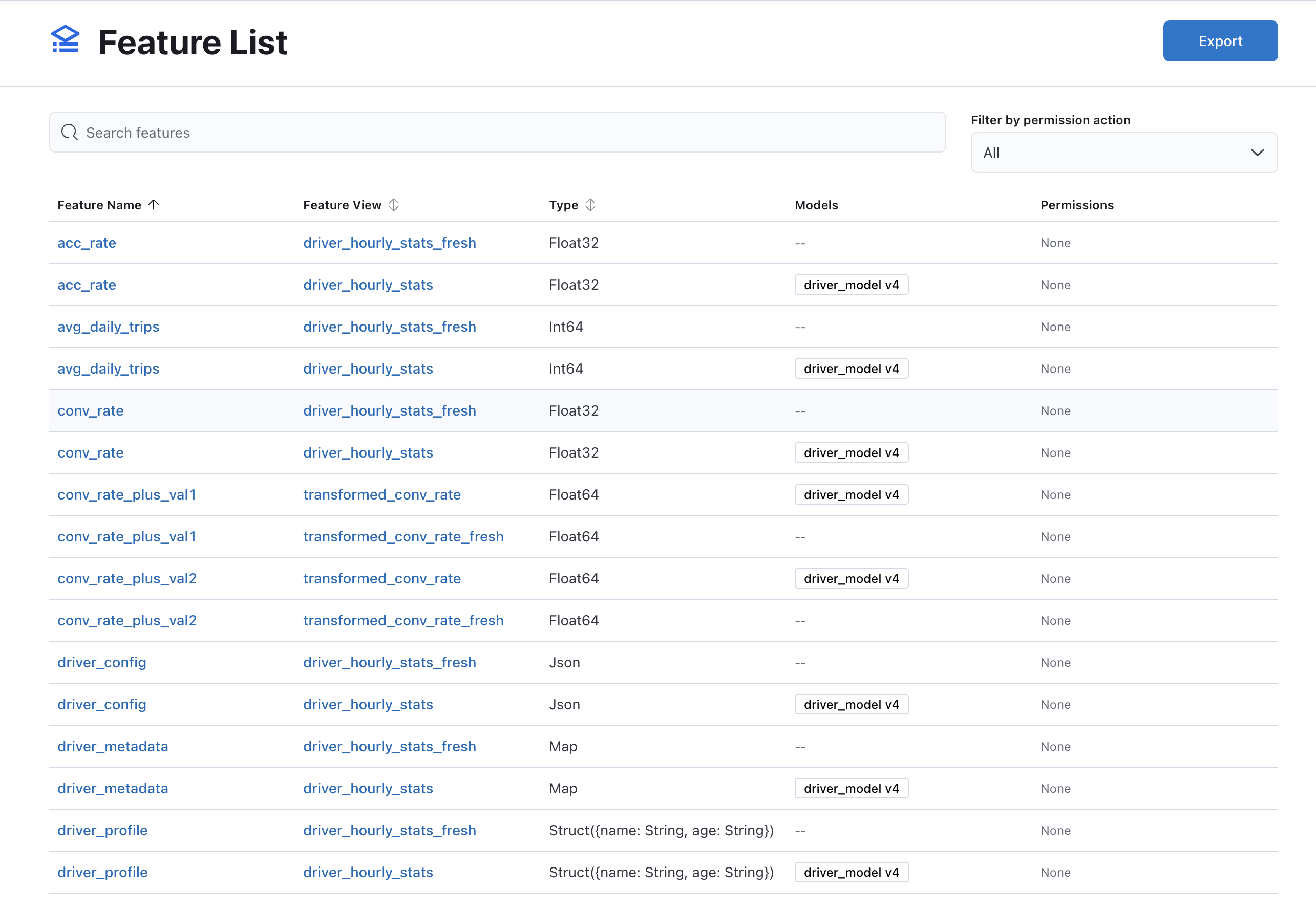
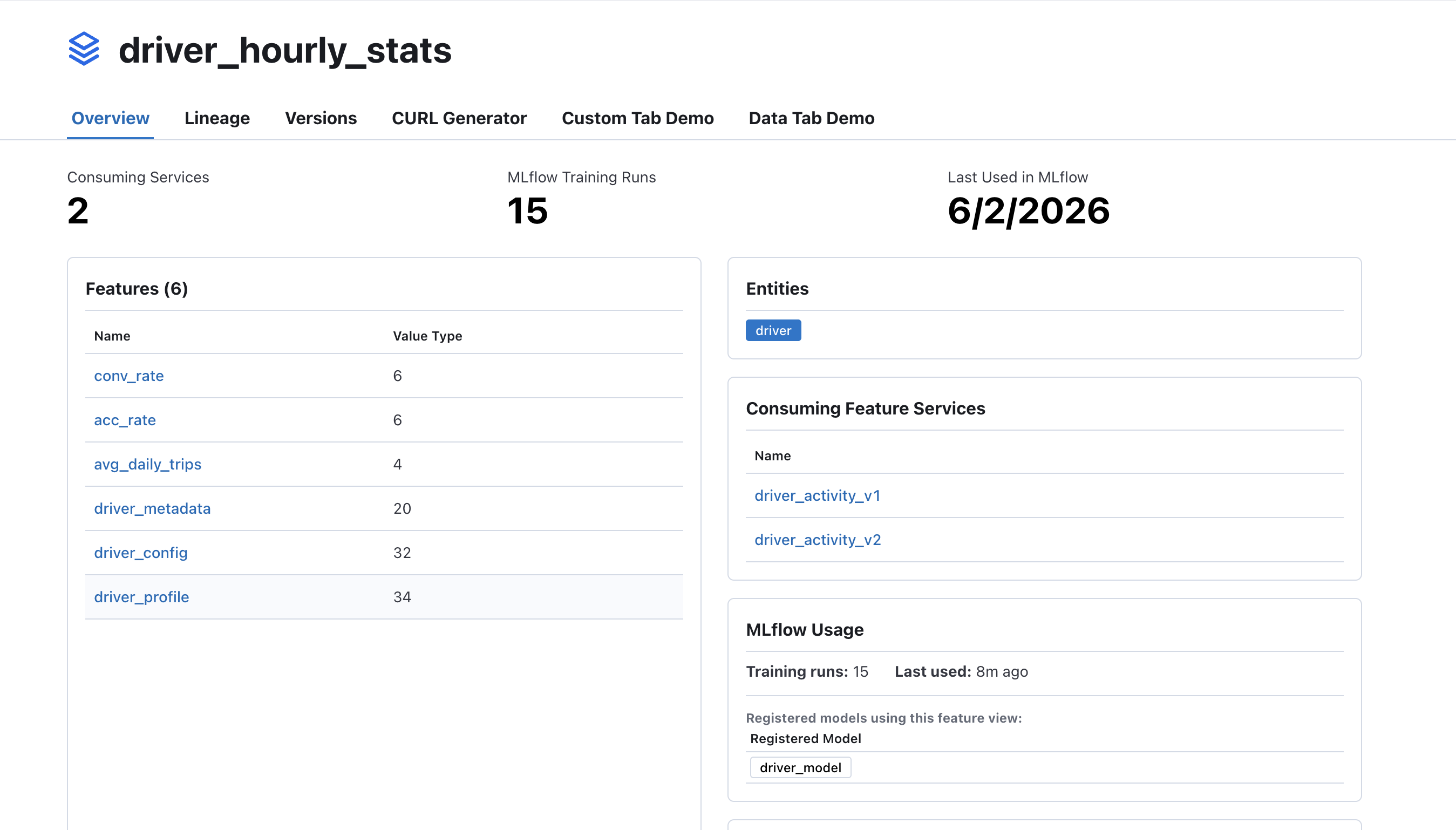
The Feast UI automatically surfaces MLflow data when the integration is enabled. Three new API endpoints power the UI:
| Endpoint | What it shows |
|---|---|
/api/mlflow-runs | All Feast-tagged runs with linked registered models |
/api/mlflow-feature-usage | Per-feature-view: run count, last used, associated models |
/api/mlflow-feature-models | Reverse index: feature ref to registered models |
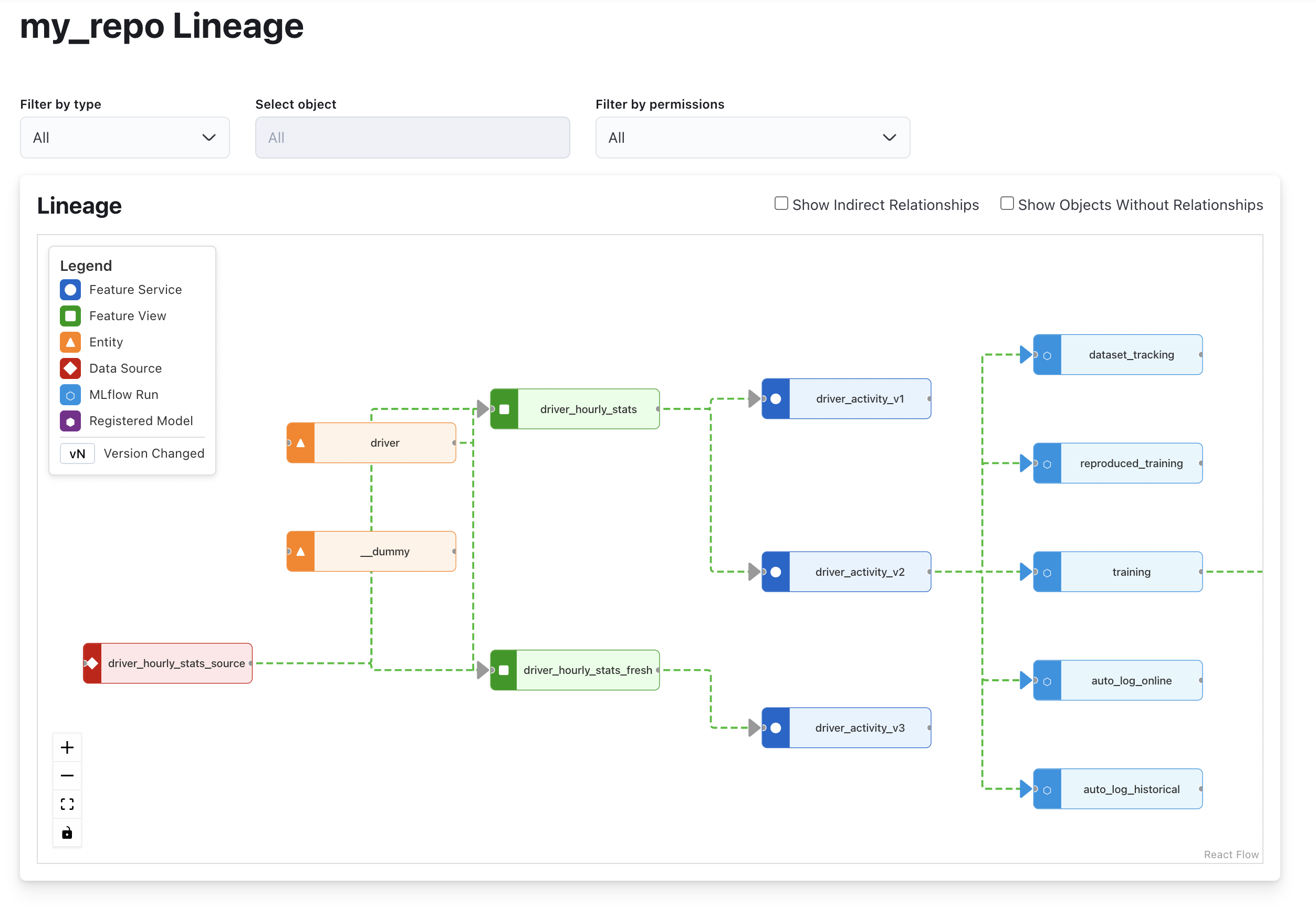
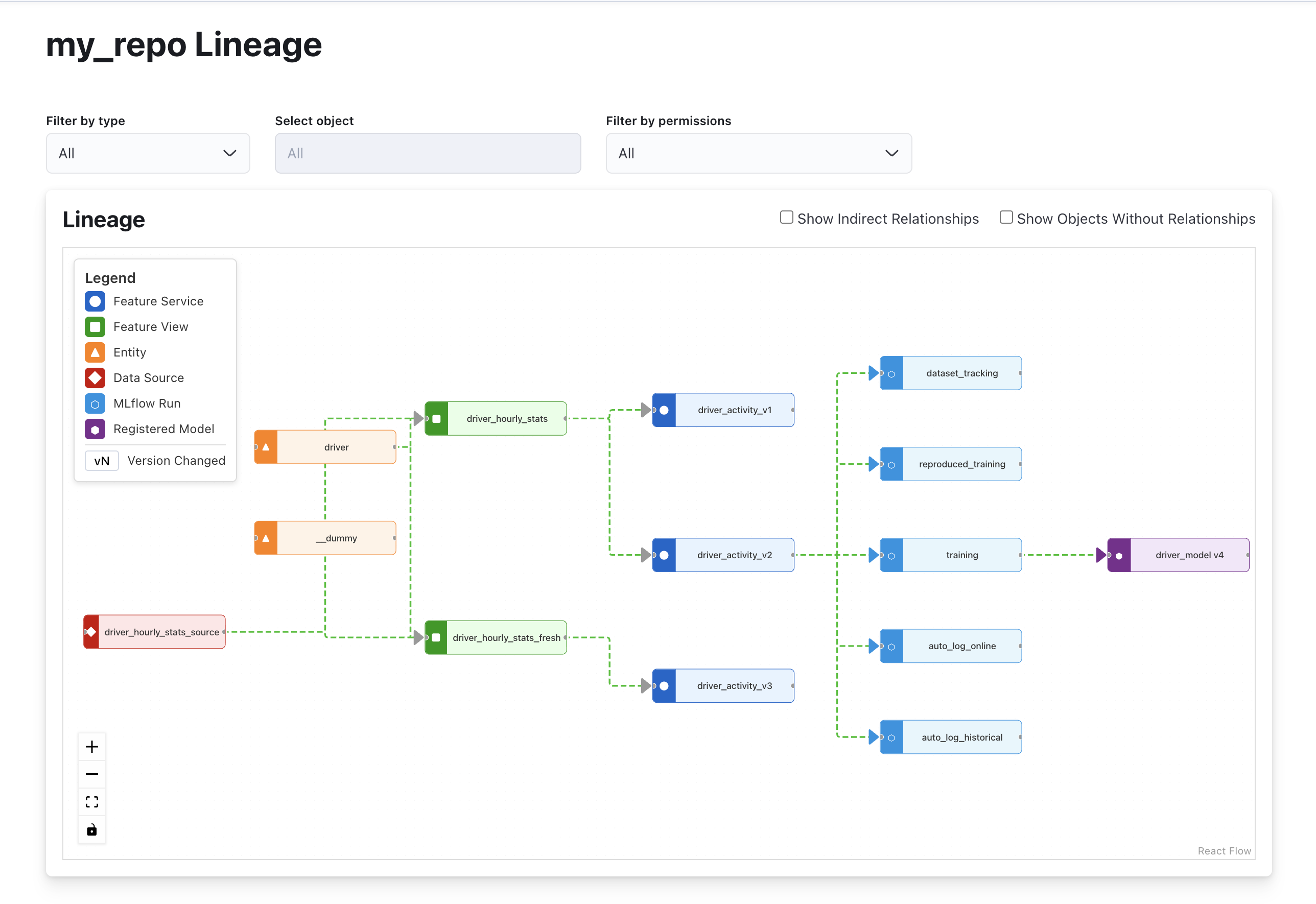
The feature view detail page shows MLflow training run count, last-used date, and a table of registered models that depend on the view. The registry graph visualization draws edges from feature services through MLflow runs to registered models.
When MLflow is not enabled, these endpoints return empty responses and the UI components are hidden — no visual noise for users who don’t use MLflow.
Configuration Reference
| Option | Type | Default | Description |
|---|---|---|---|
enabled | bool | false | Master switch |
tracking_uri | string | (env/default) | MLflow tracking URI |
auto_log | bool | true | Auto-tag runs on retrieval |
auto_log_entity_df | bool | false | Save entity DataFrame as artifact |
entity_df_max_rows | int | 100000 | Skip artifact for large DataFrames |
log_operations | bool | false | Log apply/materialize to ops experiment |
ops_experiment_suffix | string | "-feast-ops" | Ops experiment name suffix |
Getting Started
Install Feast with MLflow support:
pip install feast[mlflow]Add the mlflow: block to your feature_store.yaml, start an MLflow tracking server, and run your training code. Features are automatically linked to experiments from the first retrieval.
Join the Conversation
We’d love to hear how you’re using (or plan to use) the Feast–MLflow integration. Reach out on Slack or GitHub — issues and PRs welcome!