Tracking Feature Lineage with OpenLineage 🔗
Feast’s Native Lineage Support
Feast already provides built-in lineage tracking through its native UI. When you explore your feature store in the Feast UI, you can visualize relationships between data sources, entities, feature views, and feature services—all without any additional configuration.
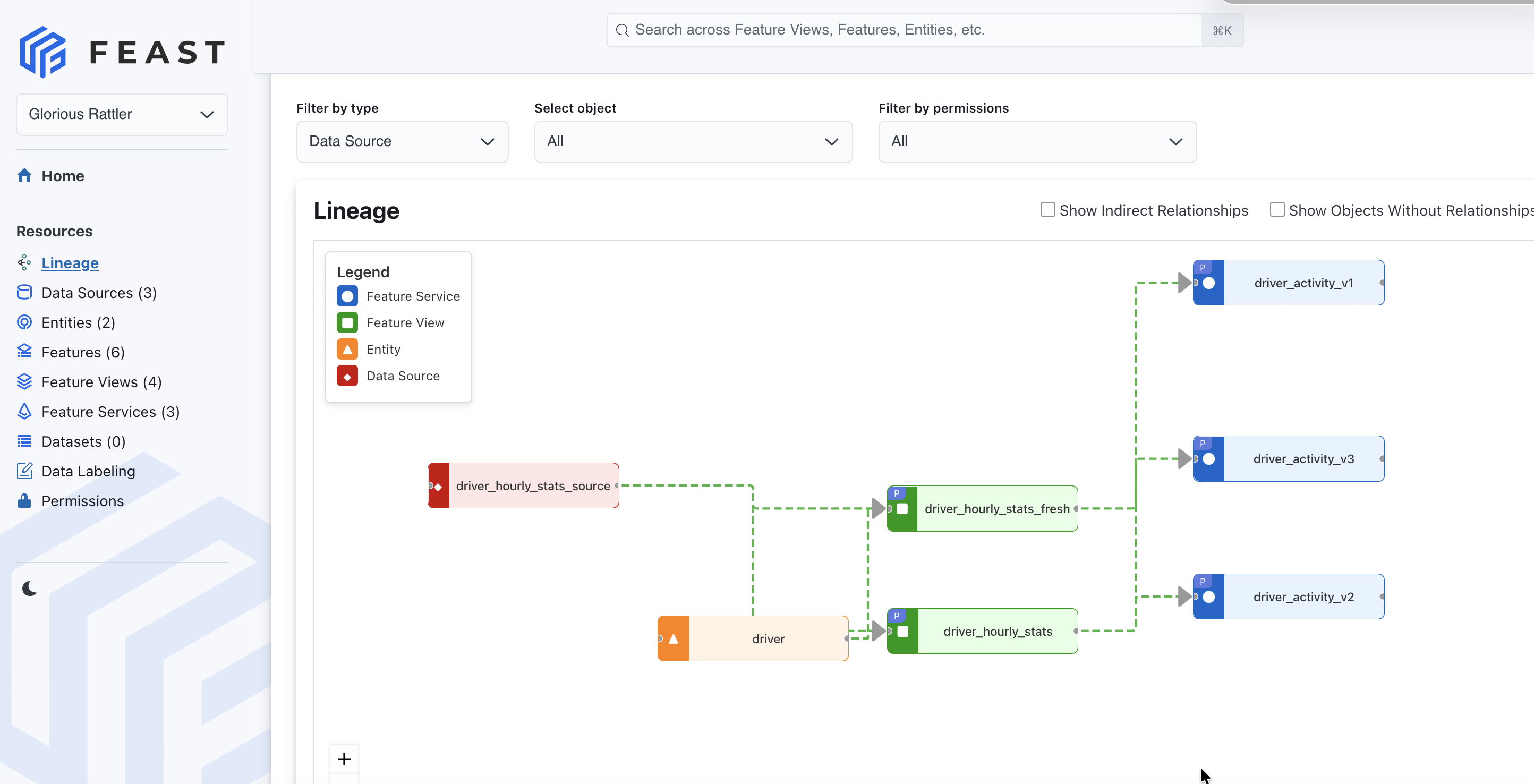
This native lineage view shows:
- How Data Sources feed into Feature Views
- Which Entities are associated with each Feature View
- How Feature Views compose Feature Services
Why OpenLineage? Lineage Across Your ML Ecosystem
While Feast’s native lineage is powerful for understanding your feature store, modern ML systems span many tools—data pipelines, training jobs, model registries, and serving infrastructure. OpenLineage is the open standard that connects lineage across all these systems.
We are excited to announce that Feast now supports native integration with OpenLineage, enabling you to:
- Track end-to-end ML lineage: Connect Feast feature lineage with upstream data pipelines (Airflow, Spark, dbt) and downstream model training
- Unified visibility: See your entire ML data flow in a single lineage graph
- Interoperability: Use any OpenLineage-compatible tool
With this integration, Feast automatically tracks and emits lineage events whenever you apply feature definitions or materialize features—no code changes required. Simply enable OpenLineage in your feature_store.yaml, and Feast handles the rest.
Why Data Lineage Matters for Feature Stores
Feature stores manage the lifecycle of ML features, from raw data sources to model inference. As ML systems grow in complexity, teams often struggle to answer fundamental questions:
- Where does this feature’s data come from?
- Which models depend on this feature view?
- What downstream impact will changing this data source have?
- How do I audit the data flow for compliance?
OpenLineage solves these challenges by providing a standardized way to capture and visualize data lineage. By integrating OpenLineage into Feast, ML teams gain automatic visibility into their feature engineering pipelines without manual instrumentation.
How It Works
The integration automatically emits OpenLineage events for two key operations:
Registry Changes (feast apply)
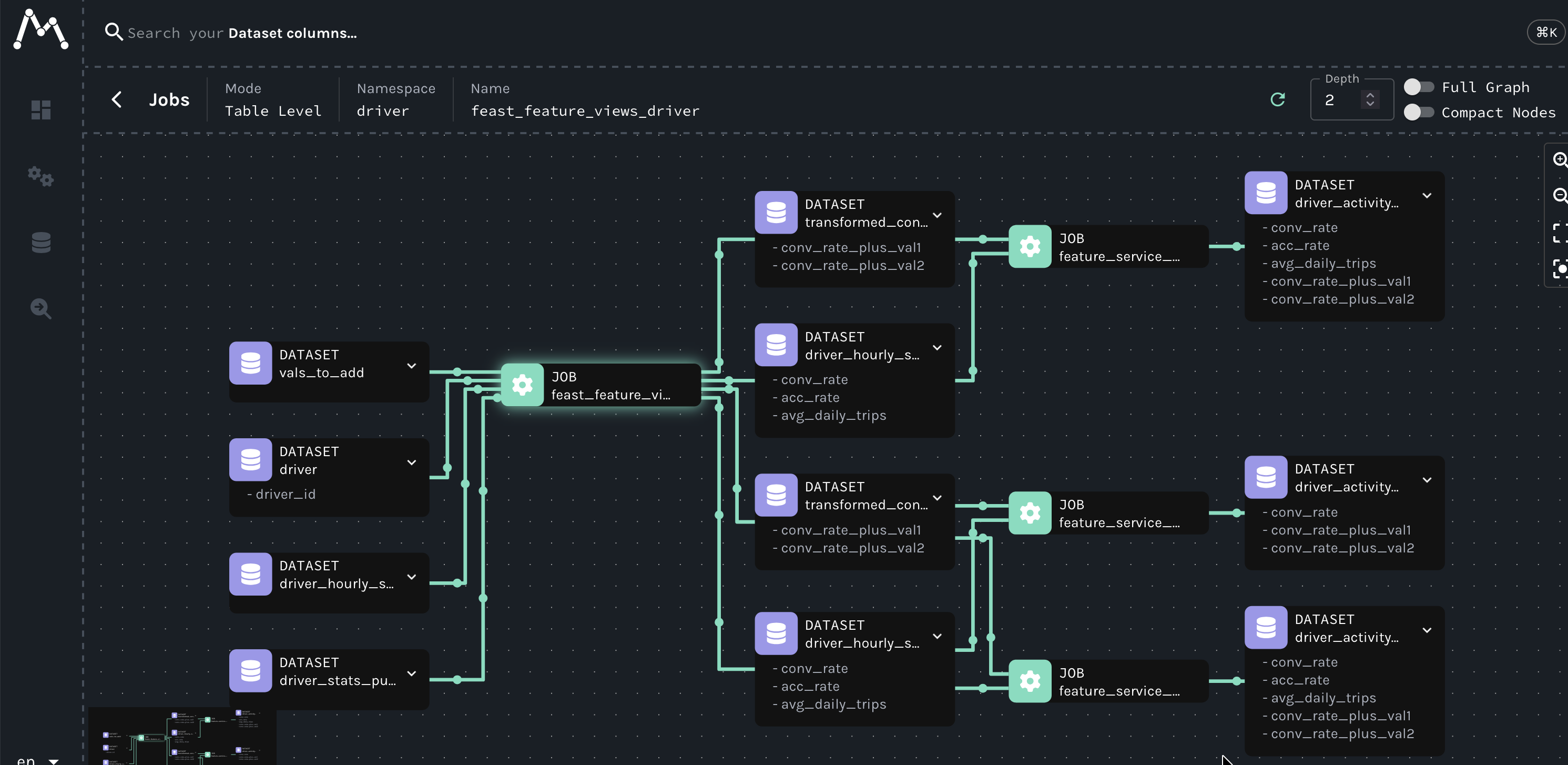
When you run feast apply, Feast creates a lineage graph that mirrors what you see in the Feast UI:
DataSources ──┐
              ├──→ feast_feature_views_{project} ──→ FeatureViews
Entities ─────┘                                          │
                                                         │
                                                         ▼
                                     feature_service_{name} ──→ FeatureService
This creates two types of jobs:
feast_feature_views_{project}: Shows how DataSources and Entities flow into FeatureViewsfeature_service_{name}: Shows which FeatureViews compose each FeatureService
Feature Materialization (feast materialize)
When materializing features, Feast emits START, COMPLETE, and FAIL events, allowing you to track:
- Which feature views were materialized
- The time window of materialization
- Success or failure status
- Duration and row counts
Getting Started
Step 1: Install OpenLineage
pip install feast[openlineage]Step 2: Configure Your Feature Store
Add the openlineage section to your feature_store.yaml:
project: my_fraud_detection
registry: data/registry.db
provider: local
online_store:
  type: sqlite
  path: data/online_store.db

openlineage:
  enabled: true
  transport_type: http
  transport_url: http://localhost:5000
  namespace: feast
Step 3: Start Marquez (Optional)
Marquez is the reference implementation for OpenLineage and provides a beautiful UI for exploring lineage:
docker run -p 5000:5000 -p 3000:3000 marquezproject/marquezStep 4: Apply Your Features
from feast import FeatureStore

fs = FeatureStore(repo_path="feature_repo")

# This automatically emits lineage events!
fs.apply([
    driver_entity,
    driver_stats_source,
    driver_hourly_stats_view,
    driver_stats_service
])
Visit http://localhost:3000 to see your lineage graph in Marquez!
Rich Metadata Tracking
The integration doesn’t just track relationships—it captures comprehensive metadata about your Feast objects:
Feature Views
- Feature names, types, and descriptions
- TTL (time-to-live) configuration
- Associated entities
- Custom tags
- Online/offline store enablement
Feature Services
- Constituent feature views
- Total feature count
- Service-level descriptions and tags
Data Sources
- Source type (File, BigQuery, Snowflake, etc.)
- Connection URIs
- Timestamp fields
- Field mappings
All this metadata is attached as OpenLineage facets, making it queryable and explorable in any OpenLineage-compatible tool.
Try It Out: Complete Working Example
We’ve included a complete working example in the Feast repository that demonstrates the OpenLineage integration end-to-end. The example creates a driver statistics feature store and shows how lineage events are automatically emitted.
Run the example:
# Start Marquez first
docker run -p 5000:5000 -p 3000:3000 marquezproject/marquez

# Clone and run the example
cd feast/examples/openlineage-integration
python openlineage_demo.py --url http://localhost:5000

# View lineage at http://localhost:3000
The example demonstrates:
- Creating entities, data sources, feature views, and feature services
- Automatic lineage emission on
feast apply - Materialization tracking with START/COMPLETE events
- Feature retrieval (no lineage events for retrieval operations)
In Marquez, you’ll see the complete lineage graph:
driver_stats_source(DataSource) →driver_hourly_stats(FeatureView)driver_id(Entity) →driver_hourly_stats(FeatureView)driver_hourly_stats(FeatureView) →driver_stats_service(FeatureService)
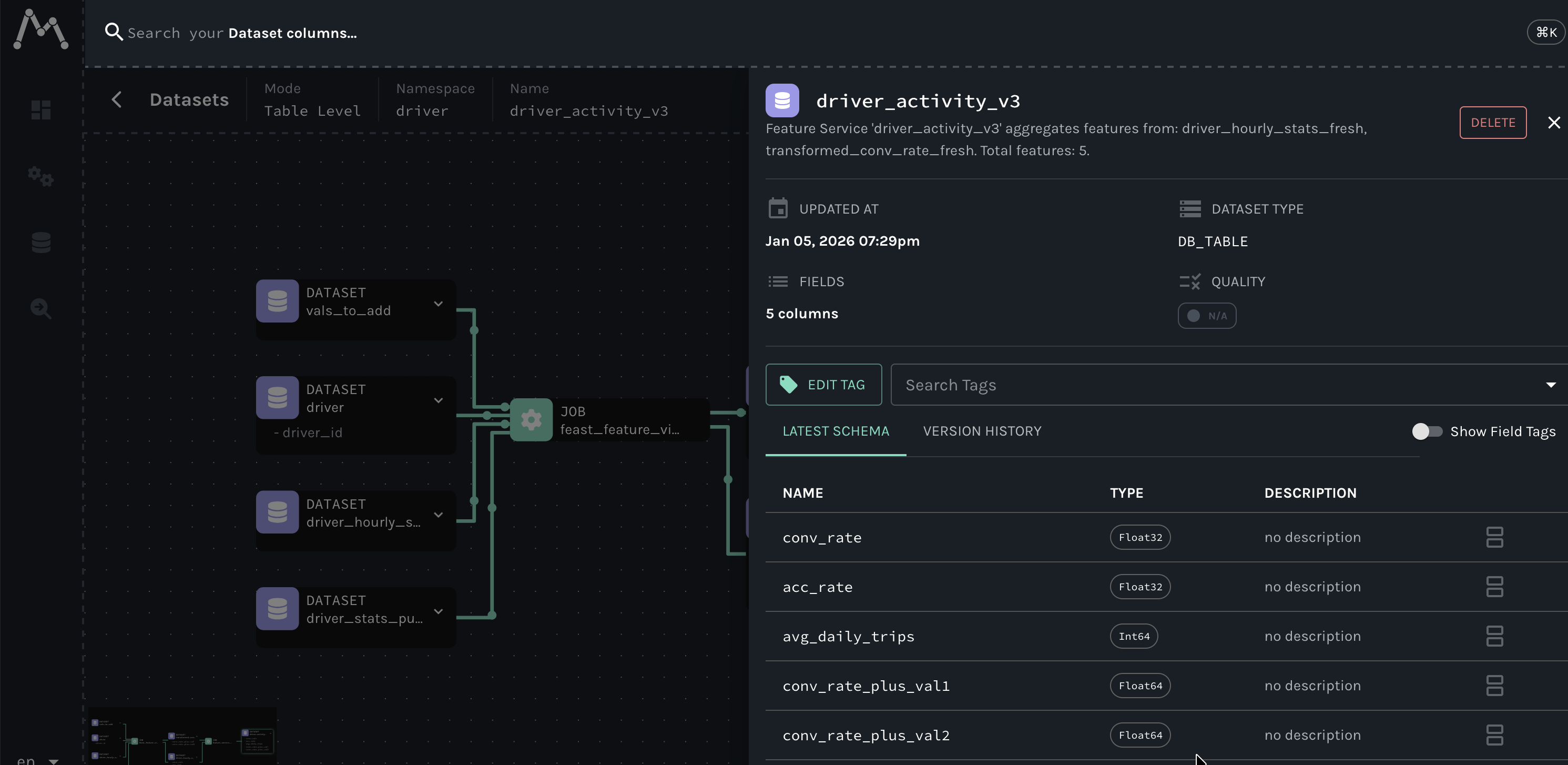
Check out the full example code for complete details including feature definitions with descriptions and tags.
Benefits for ML Teams
Debugging Made Easy
When a model’s predictions degrade, trace back through the lineage to identify which data source or feature transformation changed.
Impact Analysis
Before modifying a data source, understand all downstream feature views and services that will be affected.
Compliance & Audit
Maintain a complete audit trail of data flow for regulatory requirements like GDPR, CCPA, or SOC2.
Documentation
Auto-generated lineage serves as living documentation that stays in sync with your actual feature store configuration.
Cross-Team Collaboration
Data engineers, ML engineers, and data scientists can all view the same lineage graph to understand the feature store structure.
How Can I Get Started?
This integration is available now in the latest version of Feast. To get started:
- Check out the OpenLineage Integration documentation
- Try the example in the Feast repository
- Join the Feast Slack to share feedback and ask questions
We’re excited to see how teams use OpenLineage integration to improve their ML operations and welcome feedback from the community!