The three-database problem in production ML
A typical Feast deployment runs three different databases:
- The application’s primary database where the operational data that features are derived from actually lives.
- A dedicated online store used to serve features at low latency to live models.
- A separate warehouse used as the offline store for training-set generation and historical retrieval.
That’s three sets of credentials, three security postures, three monitoring stacks, and a constant feedback loop of “the feature is in the warehouse but stale in the online store” or “we materialized last night but the model is reading yesterday’s values.”
For teams whose operational data already lives in MongoDB, this was especially painful. Until now, Feast had no native MongoDB option so teams either stood up parallel infrastructure they didn’t want, or settled for community plugins of varying maturity.
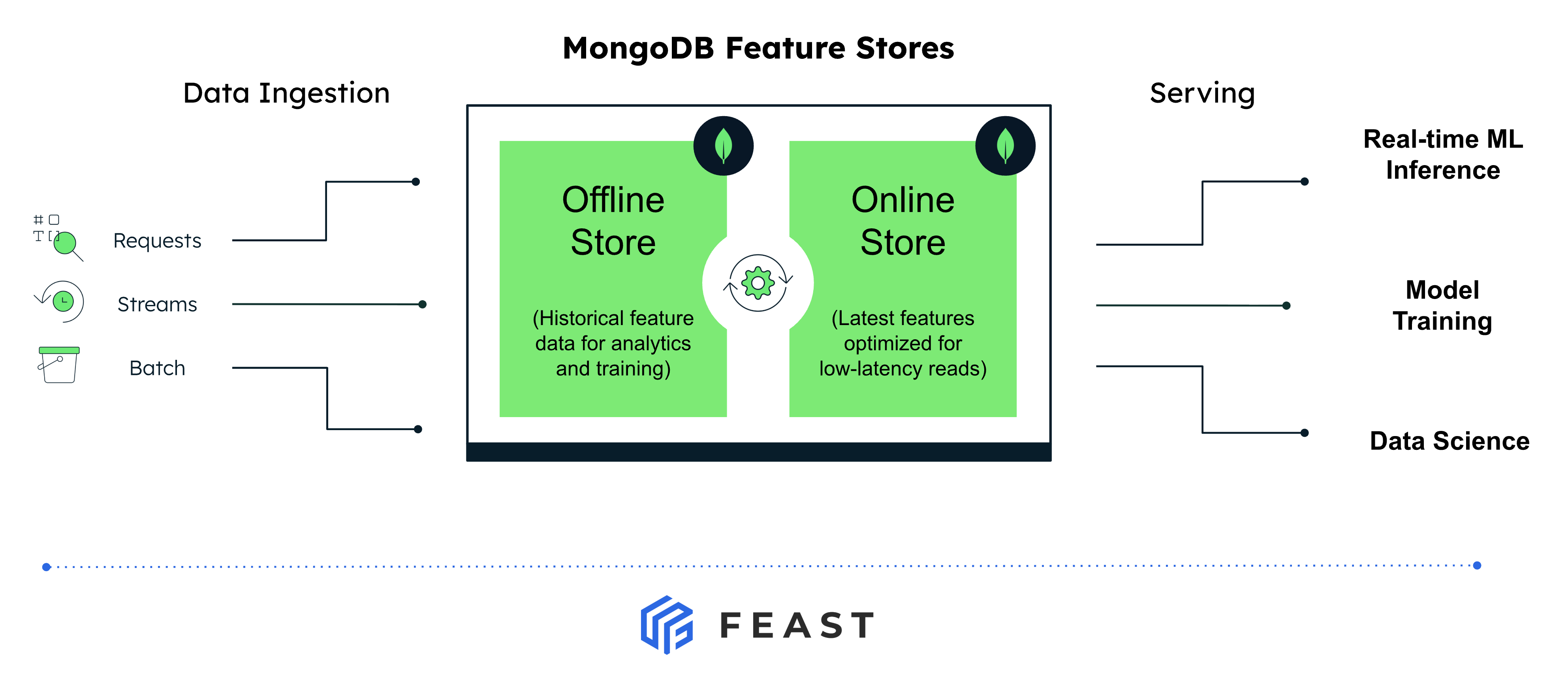
With this release, both types of the feature store run on MongoDB - same connection string, same auth, same backups, same observability. The features sit next to the operational data they were derived from.
What’s in the integration
Three components ship together as generally available:
1. MongoDBOnlineStore - low-latency feature serving
Available in Feast v0.61.0 and above. Built on the official PyMongo driver, with both sync and native async paths (the async implementation uses PyMongo’s AsyncMongoClient). It supports online_write_batch, online_read, and their async equivalents.
Features from multiple feature views for the same entity are colocated in a single MongoDB collection keyed by the serialized entity key, so a read for an entity is a single primary-key lookup, not a fan-out across collections.
2. MongoDBOfflineStore - historical retrieval and training-set generation
Available in v0.63.0 and above. Uses the MongoDB aggregation framework for retrieval, with pandas.merge_asof for the point-in-time join when entities repeat across timestamps. Ships with MongoDBSource (the DataSource class), offline_write_batch for ingest, and persist to write joined results to Parquet for downstream training pipelines.
3. MongoDB Vector Search - embeddings as first-class features
When you set vector_enabled: true on the online store, Feast automatically creates and manages MongoDB vector search indexes on any FeatureView field marked with vector_index=True. The retrieve_online_documents_v2() method runs a $vectorSearch aggregation under the hood and returns nearest-neighbor results as (event_ts, entity_key, feature_dict) tuples with a similarity score - with top_k limiting and configurable distance metrics (cosine, dot product, euclidean).
The result: a team running RAG, recommenders, or agent workloads can store, serve, and similarity-search feature embeddings in the same Atlas cluster as their other features — with no separate vector database to bolt on.
Quick start
Install
pip install 'feast[mongodb]'Configure your feature_store.yaml
Point both the online and offline store at the same Atlas cluster. No separate Atlas feature flag or opt-in required.
project: my_feature_repo
registry: data/registry.db
provider: local

online_store:
  type: mongodb
  connection_string: "mongodb+srv://<user>:<password>@<cluster>.mongodb.net"
  database: "feast_online"

offline_store:
  type: mongodb
  connection_string: "mongodb+srv://<user>:<password>@<cluster>.mongodb.net"
  database: "feast_offline"

entity_key_serialization_version: 3
Define a feature view backed by MongoDBSource
from datetime import timedelta
from feast import Entity, FeatureView, Field
from feast.types import Float32, Int64
from feast.infra.offline_stores.contrib.mongodb_offline_store.mongodb_source import (
    MongoDBSource,
)

driver = Entity(name="driver", join_keys=["driver_id"])

driver_stats_source = MongoDBSource(
    name="driver_stats_source",
    database="feast_offline",
    collection="driver_stats",
    timestamp_field="event_timestamp",
    created_timestamp_column="created",
)

driver_stats_fv = FeatureView(
    name="driver_hourly_stats",
    entities=[driver],
    ttl=timedelta(days=7),
    schema=[
        Field(name="conv_rate", dtype=Float32),
        Field(name="acc_rate", dtype=Float32),
        Field(name="avg_daily_trips", dtype=Int64),
    ],
    online=True,
    source=driver_stats_source,
)
Apply, materialize, and serve
feast apply
feast materialize-incremental $(date -u +"%Y-%m-%dT%H:%M:%S")
from feast import FeatureStore
store = FeatureStore(repo_path=".")
features = store.get_online_features(
features=[
"driver_hourly_stats:conv_rate",
"driver_hourly_stats:acc_rate",
"driver_hourly_stats:avg_daily_trips",
],
entity_rows=[{"driver_id": 1001}, {"driver_id": 1002}],
).to_dict()That’s it. Same connection string, same auth model, same cluster - features in, features out.
RAG and embeddings: vector search in the same cluster
If you’re building a RAG pipeline, a recommender, or an agent that needs nearest-neighbor lookup over feature embeddings, the online store doubles as a vector store when vector_enabled is set:
online_store:
  type: mongodb
  connection_string: "mongodb+srv://<user>:<password>@<cluster>.mongodb.net"
  database: "feast_online"
  vector_enabled: true
  vector_index_wait_timeout: 60
  vector_index_wait_poll_interval: 2
Mark the embedding field on your FeatureView:
from feast import FeatureView, Field
from feast.types import Array, Float32, Int64, String, UnixTimestamp

document_embeddings = FeatureView(
    name="embedded_documents",
    entities=[item],
    schema=[
        Field(
            name="vector",
            dtype=Array(Float32),
            vector_index=True,             # ← enable vector index
            vector_search_metric="COSINE", # cosine | dot product | euclidean
        ),
        Field(name="item_id", dtype=Int64),
        Field(name="sentence_chunks", dtype=String),
        Field(name="event_timestamp", dtype=UnixTimestamp),
    ],
    source=rag_documents_source,
)
When you run feast apply, Feast creates the corresponding Atlas vector search index. When the feature view is removed, the index is dropped. The vector_index_wait_timeout and vector_index_wait_poll_interval settings control how long Feast waits for newly created Atlas Search indexes to become queryable before returning.
Querying nearest neighbors is then one call:
results = store.retrieve_online_documents_v2(
    features=[
        "embedded_documents:vector",
        "embedded_documents:item_id",
        "embedded_documents:sentence_chunks",
    ],
    query=query_embedding,   # list[float] of the same dim
    top_k=5,
    distance_metric="COSINE",
).to_df()
Under the hood, this becomes a $vectorSearch aggregation against your Atlas cluster - no second system to provision, no vector data to keep in sync with the rest of your features.
Why this matters
A few reasons we think this lands in the right place for ML teams already on MongoDB:
- One database for training and inference. The same Atlas cluster powers historical retrieval, materialization, and online serving. No ETL pipelines pushing features from a warehouse. Update a feature once, see it everywhere.
- One security and compliance posture. Atlas networking, IAM, encryption, and audit logging cover both halves of the feature store. Architects don’t have to add a new database vendor and a new threat model to say yes to ML.
- Vector and operational data colocated. For RAG, recommenders, and agents, the embeddings live next to the entity data they describe. Filter your vector search on operational fields with the same query language you already use.
- Flexible schema where it helps. Feature engineering is iterative. MongoDB’s document model means adding a field to a feature view doesn’t require a schema migration on day one.
- Async serving when you need it. The online store ships a native async path on
AsyncMongoClient, so feature lookups don’t block the rest of your serving stack.
Where to next
- Online store reference: Feast docs - MongoDB online store
- Offline store reference: Feast docs - MongoDB offline store
- Vector search: Feast docs - Vector Search
- Tutorial: Integrate MongoDB with Feast
If you’re already on MongoDB and want to standardize your ML stack on a single backend, this is the time to try it. Spin up a feature repo, point both stores at your cluster, and let us know how it goes - issues and PRs welcome on GitHub.