If you’ve tried to connect an AI agent to Feast’s vector search, you’ve probably hit this wall: the agent needs to search your feature store, but Feast expects a raw embedding vector. The agent doesn’t have one. It has a question in English.
Until now, the workaround was ugly. You’d call an embedding provider (OpenAI, Ollama, whatever) to turn the text into a float array, then pass that array to Feast’s vector search endpoint (POST /search, formerly retrieve-online-documents). Every client had to know both APIs, carry both sets of credentials, and run glue code whose only job was bridging the gap.
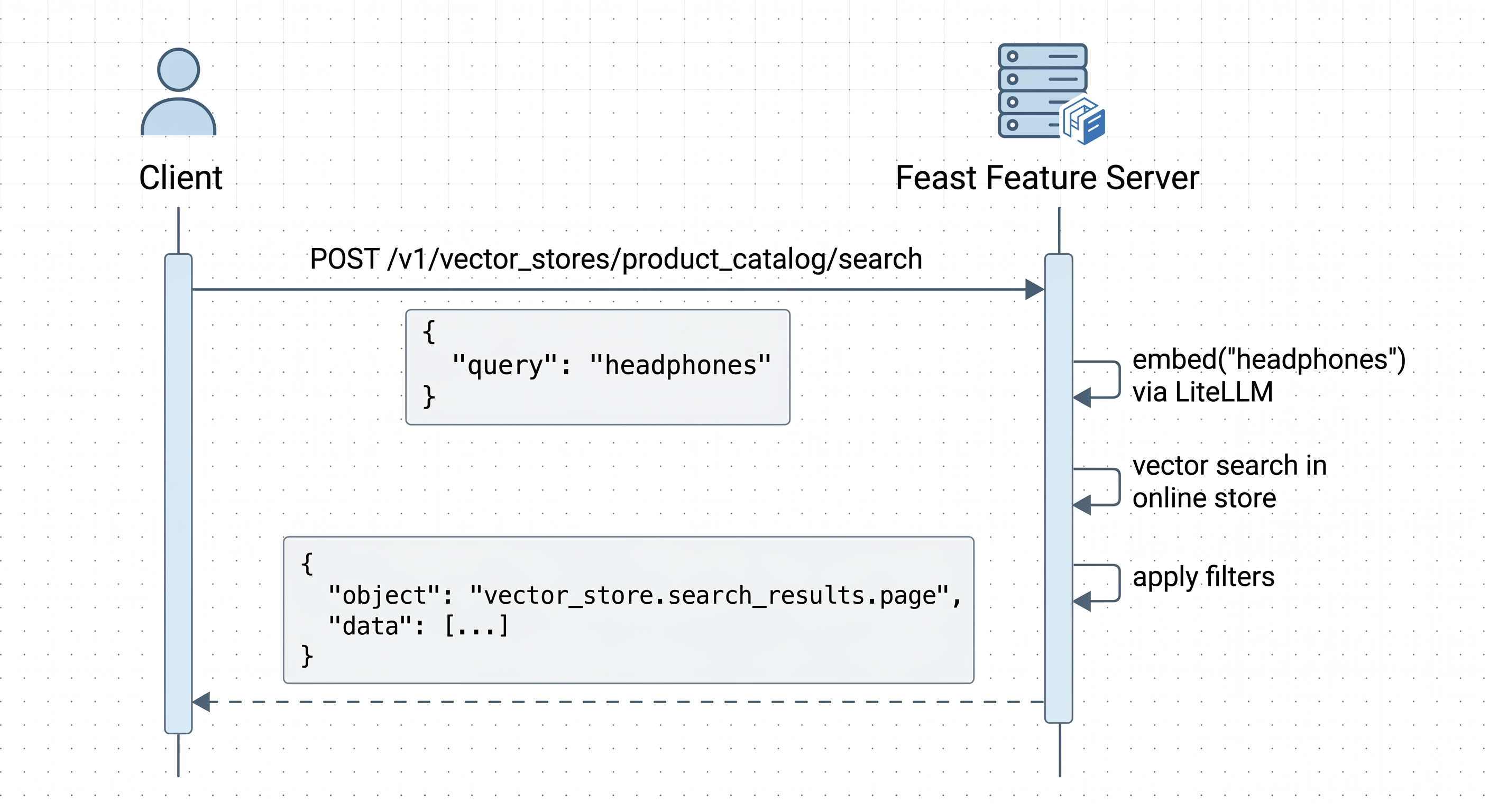
Feast now has a new endpoint: POST /v1/vector_stores/{vector_store_id}/search. It follows the OpenAI Vector Store Search API format, including proper vs_{hash} identifiers for vector stores. You send text, Feast handles the embedding internally, and you get results back in the same JSON shape that OpenAI returns. No float arrays, no extra SDK.
Each feature view with vector search enabled gets a deterministic vs_ identifier (e.g. vs_a1b2c3d4e5f6...). Discover them via GET /v1/vector_stores.
The two-API tax
Here’s what searching Feast looked like before:
import openai
import requests

# Step 1: Call the embedding provider yourself
embed_response = openai.embeddings.create(
    model="text-embedding-3-small",
    input="wireless noise-cancelling headphones"
)
query_vector = embed_response.data[0].embedding  # 1536 floats

# Step 2: Call Feast's proprietary API with the raw vector
result = requests.post("http://feast-server:6566/search", json={
    "features": [
        "product_catalog:vector",
        "product_catalog:name",
        "product_catalog:description",
        "product_catalog:price",
    ],
    "query": query_vector,
    "top_k": 5,
    "api_version": 2,
})
This works fine. But it has costs that add up:
- Every service calling Feast needs an embedding SDK, an API key, and logic to handle the embedding call. Five microservices means five places managing embedding credentials.
- LLM agents can’t use it. They discover tools through MCP or function calling, and they know how to call OpenAI-shaped endpoints. They don’t know how to compute embeddings and pass raw float arrays to a custom API.
- The embedding model becomes a client-side decision. Different clients might use different models or versions, which means inconsistent search results against the same vector store.
- Feast’s filter syntax is its own format. Not something an agent framework knows out of the box.
One endpoint, standard format
With the new endpoint, that same search looks like this:
import requests

# First, discover your vector store IDs
stores = requests.get("http://feast-server:6566/v1/vector_stores").json()
vs_id = stores["data"][0]["id"]  # e.g. "vs_a1b2c3d4e5f6..."

# Then search using the vs_ identifier
result = requests.post(
    f"http://feast-server:6566/v1/vector_stores/{vs_id}/search",
    json={
        "query": "wireless noise-cancelling headphones",
        "max_num_results": 5,
    },
)
No embedding SDK. No raw vectors. The request and response match OpenAI’s format, so anything that already talks to OpenAI can talk to Feast.
What happens under the hood
When Feast receives this request, it:
- Embeds the query server-side using the model configured in
feature_store.yaml(via Sentence Transformers for local inference — no external API key required). - Runs vector similarity search against the feature view’s online store (Postgres/pgvector, Milvus, Elasticsearch, SQLite, or whatever backend you’ve configured).
- Applies filters if you provided any, using string equality, numeric comparisons, or compound AND/OR conditions in the OpenAI filter format.
- Returns results in OpenAI’s
vector_store.search_results.pageformat.
Because the embedding model is a server-side configuration, every client gets consistent results. No more worrying about whether service A is using text-embedding-3-small while service B accidentally stuck with ada-002.
Setting it up
Step 1: Configure the embedding model
Add an embedding_model section to your feature_store.yaml:
project: my_project
registry: data/registry.db
provider: local

online_store:
  type: postgres
  host: localhost
  port: 5432
  database: feast
  user: feast
  password: ${DB_PASSWORD}
  pgvector_enabled: true
  vector_len: 384
  enable_openai_compatible_store: true

embedding_model:
  provider: sentence_transformers   # default; can be omitted
  model: all-MiniLM-L6-v2
Feast uses Sentence Transformers for embedding, so everything runs locally — no external API key required. You can use any HuggingFace model compatible with SentenceTransformer:
# Default — lightweight, fast
embedding_model:
  model: all-MiniLM-L6-v2

# Higher quality, larger model
embedding_model:
  model: BAAI/bge-small-en-v1.5
Step 2: Define a feature view with vector search
from feast import Entity, FeatureView, Field
from feast.types import Array, Float32, String, Float64, Int64
from datetime import timedelta

product = Entity(name="product_id", join_keys=["product_id"])

product_catalog = FeatureView(
    name="product_catalog",
    entities=[product],
    schema=[
        Field(
            name="vector",
            dtype=Array(Float32),
            vector_index=True,
            vector_search_metric="COSINE",
        ),
        Field(name="name", dtype=String),
        Field(name="description", dtype=String),
        Field(name="category", dtype=String),
        Field(name="price", dtype=Float64),
        Field(name="rating", dtype=Float64),
    ],
    source=product_source,
    ttl=timedelta(days=7),
)
Step 3: Apply, load data, and serve
feast apply
feast serve
Step 4: Discover your vector store ID
curl http://localhost:6566/v1/vector_stores{
"object": "list",
"data": [
{
"id": "vs_a1b2c3d4e5f6a1b2c3d4e5f6",
"object": "vector_store",
"name": "product_catalog",
"status": "completed",
"created_at": 1717200000
}
]
}Step 5: Search
curl -X POST http://localhost:6566/v1/vector_stores/vs_a1b2c3d4e5f6a1b2c3d4e5f6/search \
  -H "Content-Type: application/json" \
  -d '{
    "query": "wireless noise-cancelling headphones",
    "max_num_results": 3
  }'
Response:
{
  "object": "vector_store.search_results.page",
  "search_query": ["wireless noise-cancelling headphones"],
  "data": [
    {
      "file_id": "vs_a1b2c3d4e5f6a1b2c3d4e5f6_42",
      "filename": "vs_a1b2c3d4e5f6a1b2c3d4e5f6",
      "score": 0.92,
      "attributes": {
        "name": "Sony WH-1000XM5",
        "description": "Premium wireless noise-cancelling headphones",
        "category": "Electronics",
        "price": 349.99,
        "rating": 4.8
      },
      "content": [
        {"type": "text", "text": "Sony WH-1000XM5"},
        {"type": "text", "text": "Premium wireless noise-cancelling headphones"},
        {"type": "text", "text": "Electronics"}
      ]
    }
  ],
  "has_more": false,
  "next_page": null
}
The response follows OpenAI’s vector_store.search_results.page schema. Any client that already parses OpenAI search results can parse this without changes.
Filtering
The endpoint supports OpenAI-style filters for narrowing results beyond vector similarity. Filters work on the metadata stored alongside your vectors.
String filters
{
  "query": "running shoes",
  "max_num_results": 5,
  "filters": {
    "type": "eq",
    "key": "category",
    "value": "Footwear"
  }
}
Numeric filters
{
  "query": "budget laptop",
  "max_num_results": 5,
  "filters": {
    "type": "lt",
    "key": "price",
    "value": 500.0
  }
}
Compound filters (AND / OR)
{
  "query": "wireless earbuds",
  "max_num_results": 5,
  "filters": {
    "type": "and",
    "filters": [
      {"type": "eq", "key": "category", "value": "Electronics"},
      {"type": "gte", "key": "rating", "value": 4.5},
      {"type": "lt", "key": "price", "value": 200.0}
    ]
  }
}
Comparison operators: eq, ne, gt, gte, lt, lte, in, nin. Compound operators: and, or. These nest to arbitrary depth.
Numeric and boolean filters require the enable_openai_compatible_store flag in your online store config, plus a feast apply to add the value_num column to existing tables. String filters work on all existing schemas without migration.
What this means for AI agents
We built this with agents in mind. When Feast added MCP support earlier this year, agents could discover and call Feast tools dynamically. But vector search still had this gap where the agent needed to produce a float array. LLMs can’t do that.
Now the search tool is just text in, structured results out. An agent calls it the same way it calls any other OpenAI-compatible service. The feature server currently exposes these tools:
| Capability | Endpoint | What it does |
|---|---|---|
| Structured feature lookup | get-online-features | Get customer profiles, account data, etc. |
| Vector search | search | Search with a pre-computed embedding vector (or text via api_version: 2) |
| List vector stores | GET /v1/vector_stores | Discover available vector stores and their vs_ IDs |
| Get vector store | GET /v1/vector_stores/{id} | Get metadata for a specific vector store |
| Vector search (OpenAI format) | POST /v1/vector_stores/{id}/search | Search with plain text, embedding handled server-side |
| Write features / memory | write-to-online-store | Persist agent state, update features |
POST /retrieve-online-documents remains available as a deprecated alias for POST /search.
That last row is what this post is about. Before it existed, agents could read structured features and write state back, but they couldn’t search vectors without help from glue code.
What this is, and what it isn’t
This makes Feast’s vector search speak OpenAI’s protocol. It doesn’t turn Feast into a general purpose OpenAI-compatible vector database.
| Works today | Not yet |
|---|---|
GET /v1/vector_stores (list) | Creating vector stores via the API |
GET /v1/vector_stores/{id} (get) | |
POST /v1/vector_stores/{id}/search | |
| Plain text queries with server-side embedding | Client-provided embedding vectors on this endpoint |
| OpenAI-format filters (string, numeric, compound) | ranking_options.score_threshold, ranking_options.ranker, rewrite_query: true (rejected with 422) |
| All Feast online store backends | Standalone /v1/embeddings endpoint |
Feature views are still defined in Python and managed through feast apply. Data is still ingested through Feast’s existing write paths. The OpenAI-compatible layer is a read API that gives standard access to what’s already in your feature store.
Deploying on Kubernetes
Below is an example Kubernetes setup that deploys the feature server with Sentence Transformers for local embedding:
# configmap.yaml (embedding model section)
embedding_model:
  provider: sentence_transformers
  model: all-MiniLM-L6-v2
# deployment.yaml
containers:
- name: feast-server
command: ["feast", "serve", "-h", "0.0.0.0", "-p", "6566"]
ports:
- containerPort: 6566With this setup, embedding happens in-cluster. Nothing leaves your network.
Try it yourself
# Install Feast with Sentence Transformers support
pip install feast sentence-transformers
Configure your feature_store.yaml with an embedding_model section, define a feature view with vector search enabled, run feast apply, load your data, start the server with feast serve, and search:
# Discover your vector store IDs
curl -s http://localhost:6566/v1/vector_stores | python -m json.tool

# Search using the vs_ identifier from the list response
curl -s http://localhost:6566/v1/vector_stores/YOUR_VS_ID/search \
  -H "Content-Type: application/json" \
  -d '{"query": "your search query", "max_num_results": 5}' | python -m json.tool
What’s next
Next on the list: wiring up ranking_options and rewrite_query so they actually do something (right now they’re accepted but ignored). We also want a standalone /v1/embeddings endpoint for clients that just need embeddings, and eventually the ability to create feature views through the OpenAI vector store API instead of requiring Python + feast apply.
Join the conversation
If you’re using this or have thoughts on what the OpenAI-compatible layer should support next, come find us on Slack or GitHub.